Digital car key (DCK) is enabled on compatible Android devices without the need for an additional app. Google first-party apps, such as Google Wallet, shouldn't be referenced while promoting the DCK solution. Partners are encouraged to refer to DCK as an Android system feature on compatible devices.
For example:
"All you need to do is send them an invitation from your Android device."
"Set up a car key on a compatible Android device and share it with up to five friends."
"Your digital car key will then be stored in a compatible Android device."
For editorial guidelines, see Partner Marketing Hub Editorial guidelines.
Add to Wallet on Android button
To provide a consistent user experience, when you use a link that lets users pair a new vehicle key, add an Add to Wallet on Android button image before the deep link. You can use this button in apps, websites, emails, and SMS. See the Partner Marketing Hub Badge guidelines.
- To download the Add to Wallet to Android button images in dark and light theme.
- To understand the Add to Wallet to Android button integration guidelines.
- To get the Add to Wallet to Android localized text
Android
The use of the Android trademark on hardware, packaging or marketing materials of devices is restricted to Android-compatible devices. Follow the Android guidelines for guidance on referencing Android through text, logo, or wordmarks.
Vehicle OEM branded images
You must provide the following branded images. In some cases, you can provide multiple assets, along with identifiers for those assets. For information on how to provide these identifiers, see the common items table in Shared between environments.
Background card image
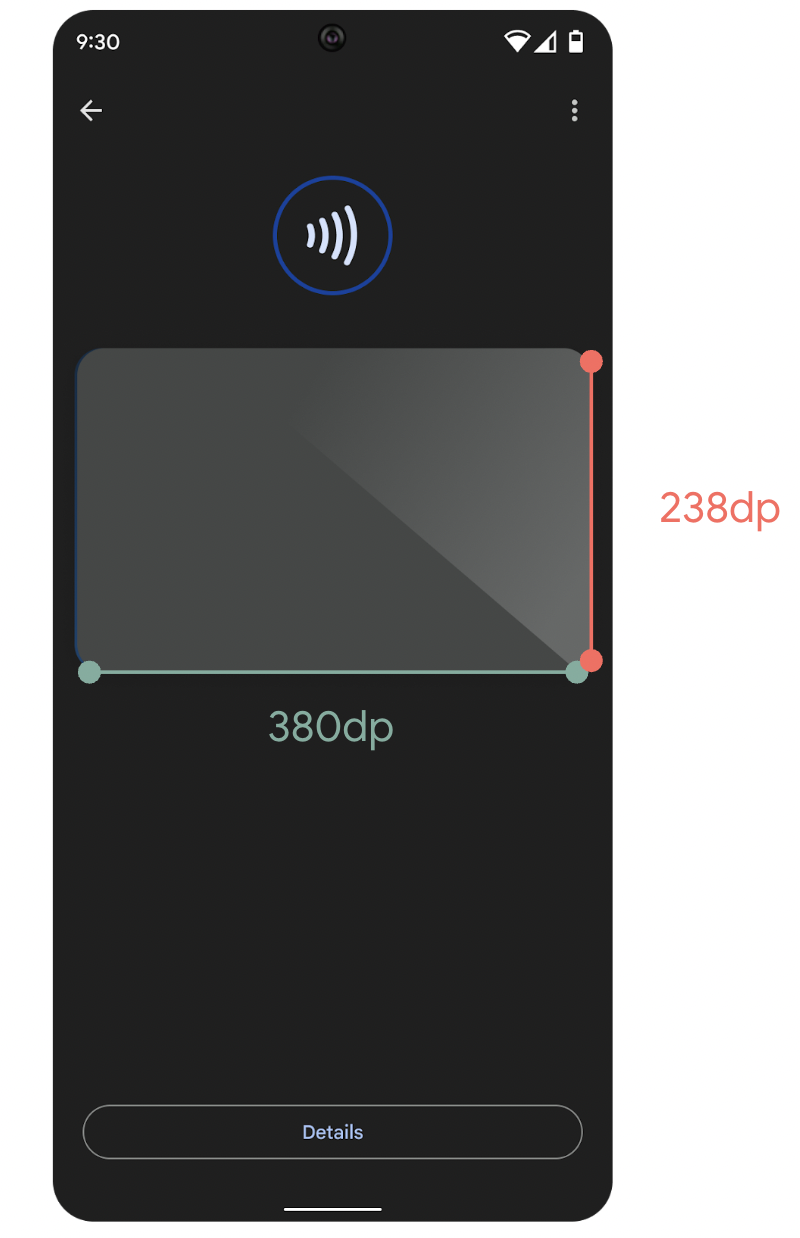
Figure 1. Position and size of the background card image.
This image is used for the background of the card.
- Required
- True
- Resolution
- 380 dp x 238 dp (1520 px x 952 px at xxxhdpi)
- Cardinality
- Supports one per
ui_identifier.
Model name overlay
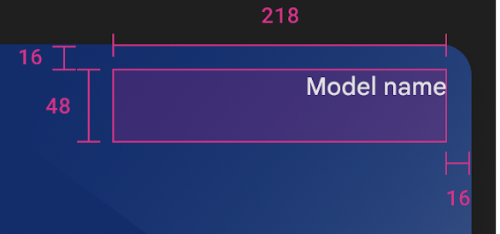
Figure 2. Model name overlay.
Avoid placing art or text in the redlined area. The model name is overlaid on
the card art. The name is the value received in the key tracking response.
- Max. characters
- 45
- Blocking area
- 218 dp x 48 dp (872 px x 192 px at xxxhdpi)
- Font color
- Black or white, automatically chosen based on the detected background in that area.
DCK icon for card collapsed view in Google Wallet

Figure 3. Digital car key collapsed view in Wallet passes overview.

Figure 4. Digital car key collapsed view in Wallet favorites.
The icon displayed on the collapsed view of the user's digital key in
Google Wallet. Pixel size scales to device size. The logo is automatically
masked to fit within a circular design. There is no need to pre-mask the logo.
Position the logo within the Safe Area. Display the logo in a
square with a full bleed background color. The logo should have a 15%
margin so that it is not truncated when masked.
- Preferred file type
- PNG
- Resolution
- 1200 px x 1200 px
- Margin
- 15%
- Image aspect ratio
- 1:1
- Artwork aspect ratio
- 1:1
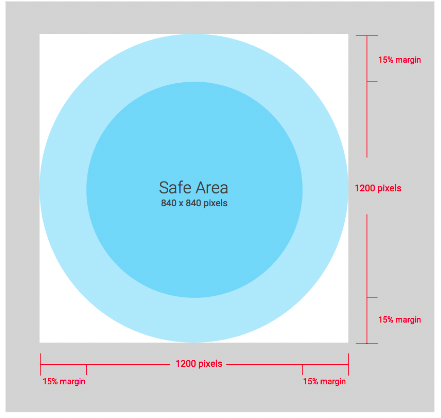
Figure 5. DCK icon for card collapsed view specification.
Android app icon
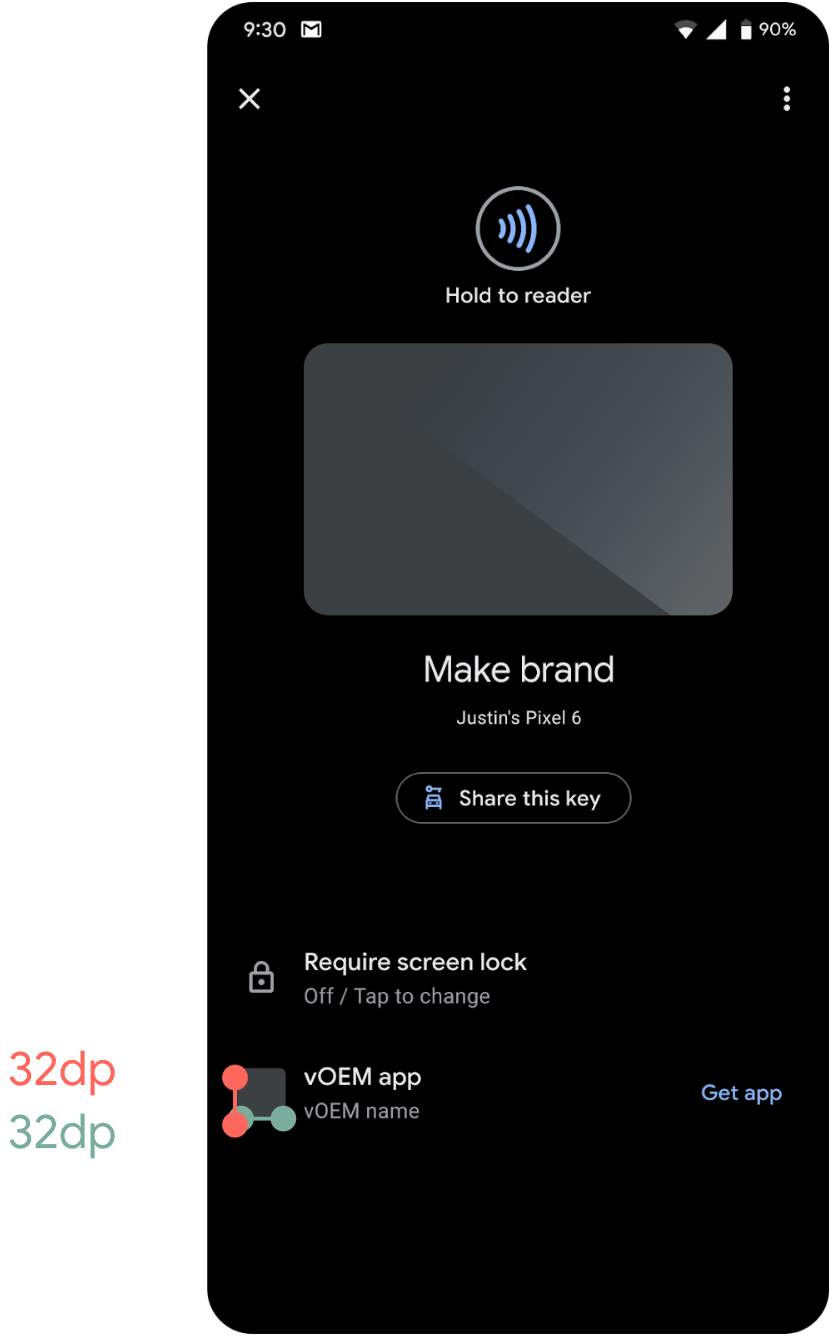
Figure 6. Android app icon.
The icon shown as a reference to your app. Can be the same icon as your app on the Google Play app store.
- Required
- True - or grant permission to use the icon from the Play Store
- Resolution
- 32 dp x 32 dp (128 px x 128 px at xxxhdpi)
- Cardinality
- One per app package name provided to Google.
Place phone to pair image
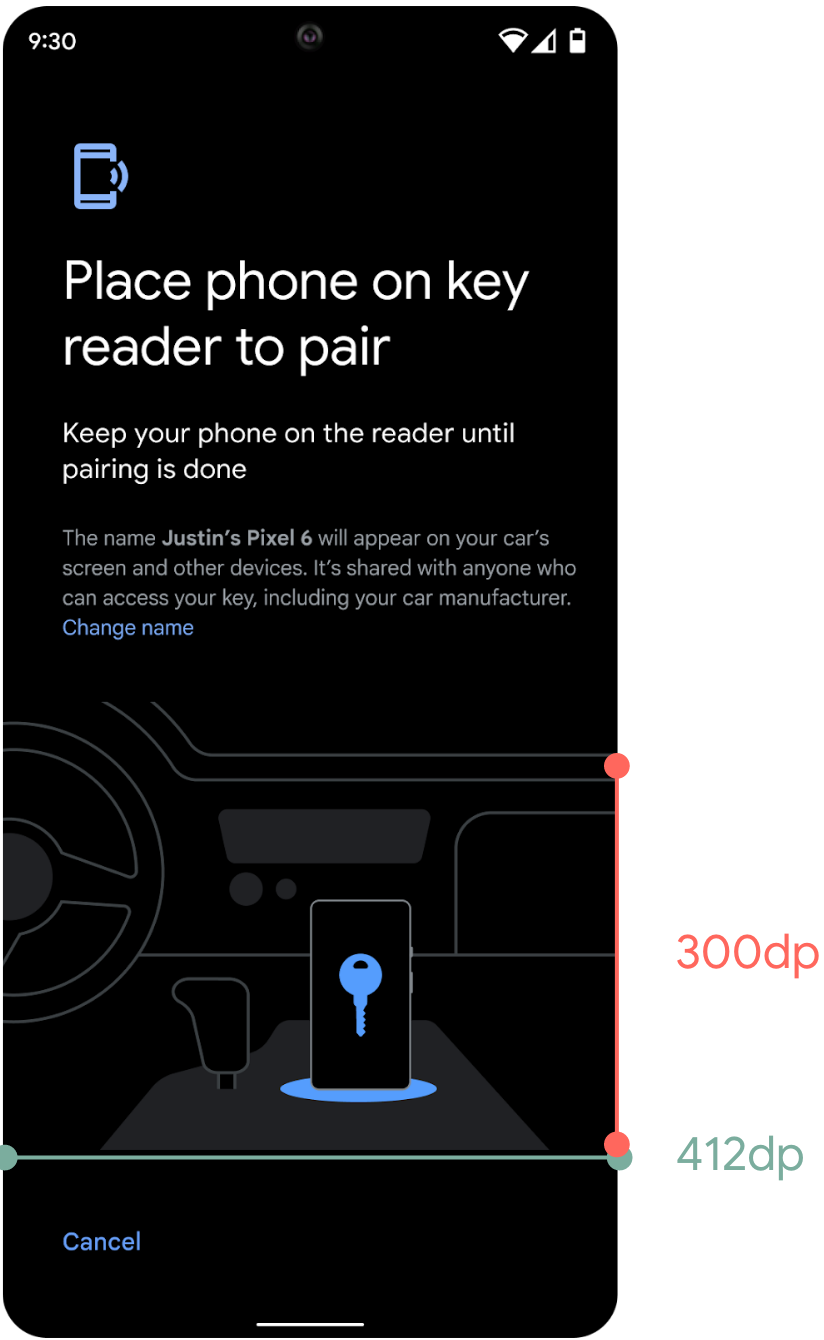
Figure 7. Place phone to pair image.
This image shows users where in the car to place the phone to begin
pairing.
- Required
- False - default displayed if none provided.
- Resolution
- 412 dp x 300 dp (1648 px x 1200 px at xxxhdpi)
- Cardinality
- One per identifier value provided during owner pairing.
DCK marketing
If you plan to use Google brands (for example, Android or Google Wallet) in your marketing material, you need to follow Google's brand guidelines and the partner brand team must review and approve the assets.
Marketing guidelines and material
Guidelines and material for DCK marketing are available on the Google Partner Marketing Hub.
Marketing material review
The Google Partner Marketing Hub offers a submission form that lets you upload your marketing material. Select Digital Car Key as primary brand in the submission form to route the request to the appropriate team. Note the listed lead times. We recommend starting early.
The Partner Marketing Hub also offers a contact form to clarify questions on brand usage before submitting any material.