In cars with smaller displays, it's important to make the most of screen real estate while also minimizing potential distractions. Drivers need to be able to seamlessly multitask while also staying focused on the road. Android Automotive OS (AAOS) provides the Dashboard framework, which is optimized for smaller, landscape-oriented displays, as a flexible framework to meet these needs.
Spatial model: How layers work
The Home screen is organized into a hierarchy of persistent and dynamic layers:
- App layer: This layer hosts the active software experience. When an app is opened, it dynamically occupies the full vertical space between the Status Bar and the Navigation Bar.
- System UI layer: This layer sits at the highest priority to provide constant access to system-level controls. It consists of a Status Bar at the top of the screen and a Navigation Bar at the bottom, framing the interactive content.
- Dashboard state (Home screen): When no specific app is active, the application space on this layer adjusts to a smaller footprint to accommodate the Home screen's layout, as detailed in the following section.
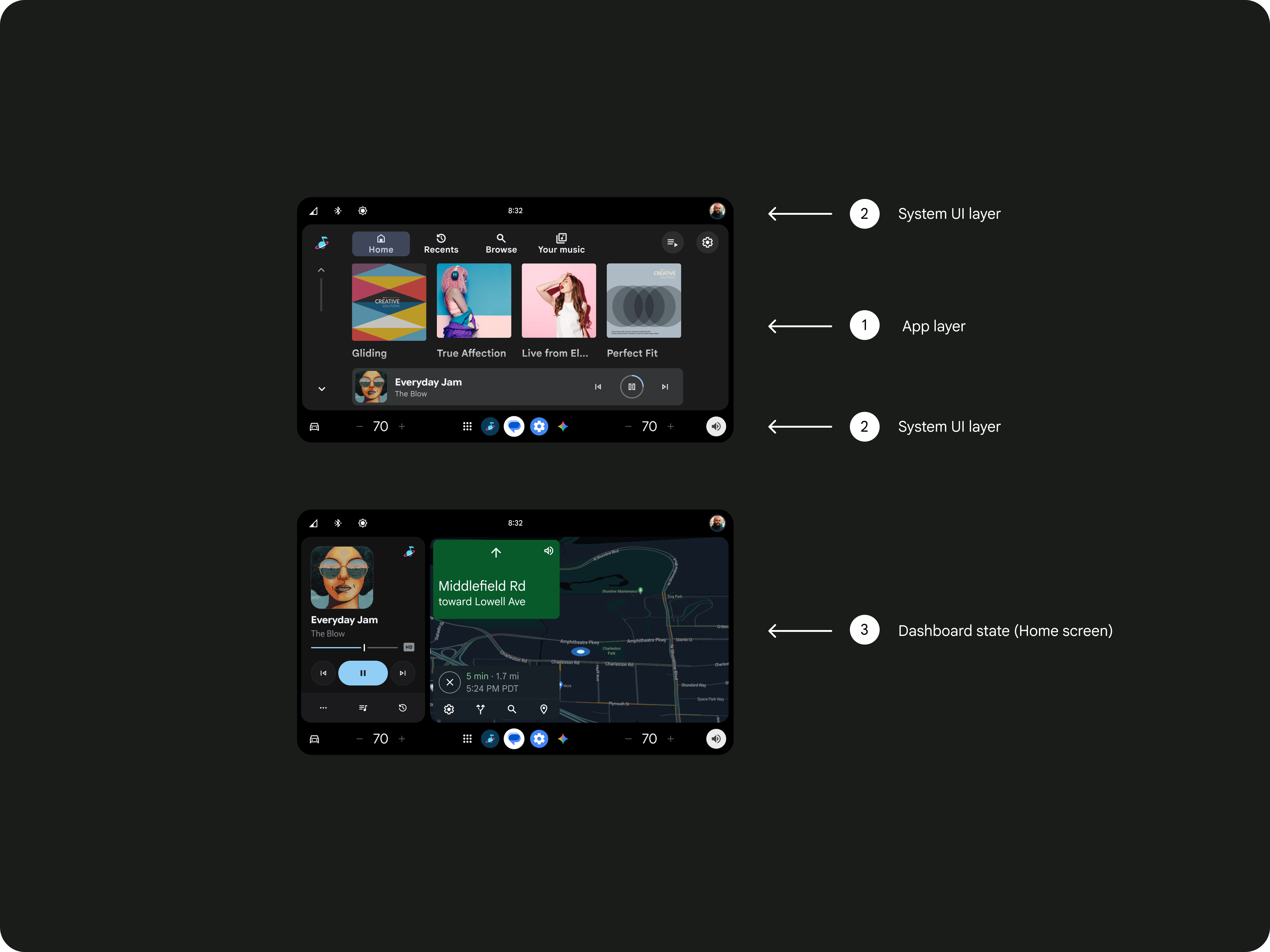
2. System UI layer
3. Dashboard state
Essential system UI elements
The dashboard framework includes these persistent elements that provide a convenient starting point for drivers:
| UI element | Description |
|---|---|
Status bar |
Located at the top, hosting connectivity icons (Bluetooth, Wi-Fi), the profile selector, and quick controls. |
Control bar |
Features dedicated audio controls and a "mini player" media card. |
System rail |
Positioned at the bottom, providing access to the app launcher, voice assistant, notifications, and climate controls. |
Design guidance
You can customize your design to reflect your brand while benefiting from pre-engineered usability and safety.
Optimize for reachability.
The framework is designed with "reach curves" in mind. Place commonly used functionality near the driver to increase usability and physical anchoring.
Enable safe multitasking.
Drivers should be able to perform multiple tasks with minimal distraction. Use the dashboard model to help ensure that media controls and navigation are always accessible, reducing the need for deep menu diving or frequent app switching.
Handle data and themes.
- Theme adaptation: Use the Dark theme for low-light conditions to reduce glare, and the Light theme for direct sunlight visibility.
- App separation: Best practices recommend running separate apps on the base and top layers; don't run the same app on both layers simultaneously.
For implementation guidelines, go here