Diferenças: notificações do carro versus notificações do celular
Mantenha tudo organizado com as coleções
Salve e categorize o conteúdo com base nas suas preferências.
The need to keep a driver's attention on the road imposes some special requirements on notifications in cars, compared to other devices
As notificações em carros têm o mesmo propósito geral que as notificações em outros dispositivos: comunicar uma pequena quantidade de informações relevantes e oportunas do sistema ou de um aplicativo. No entanto, os sistemas de notificação em veículos devem ser projetados de forma diferente para minimizar as distrações para os motoristas.
Como as notificações diferem nos carros
Visão geral das diferenças para desenvolvedores
Menos notificações
To minimize driver distraction, heads-up notifications (HUNs) in a car have tighter limitations compared to other devices.
HUNs in the car should be actionable and time-sensitive, with an importance level of HIGH or above, and they also must meet one or more of the following criteria:
Crítico para a segurança
Relevante para dirigir
Comunicações relacionadas
As notificações que aparecem na Central de Notificações são praticamente as mesmas que em outros dispositivos, com algumas categorias excluídas por serem gerenciadas em outros locais ou por terem baixa importância. Para obter detalhes sobre como as diversas categorias são gerenciadas, visite Como funcionam as notificações do carro .
Menos conteúdo por notificação
To allow drivers to glance quickly at notifications and return their eyes to the road, notifications in the car need to focus on only the most essential, easy-to-grasp information.
Nossos testes mostraram que as informações mais importantes para os motoristas são o quê e quem : o que é a notificação (mensagem, chamada, instruções de navegação etc.) e quem a enviou. Os HUNs (dispositivos de navegação integrados ao carro) enfatizam esses elementos, juntamente com um conjunto simples de ações possíveis.
Interações mais simples
To minimize distraction, notifications in the car do not include complex contextual controls, such as a long press or controls that are based on the length of the user's swiping action.
Além disso, a maioria das notificações de usuário (HUNs) aparece apenas brevemente, por um período padrão de 8 segundos, antes de serem descartadas automaticamente caso o usuário não interaja com elas. Na maioria desses casos, os usuários podem lidar com a notificação posteriormente na Central de Notificações.
For details about interactions with HUNs and in the Notification Center, visit How car notifications work .
Notification API changes and restrictions for cars
Technical details about notification effects supported differently in cars
notificações de mensagens reproduzíveis
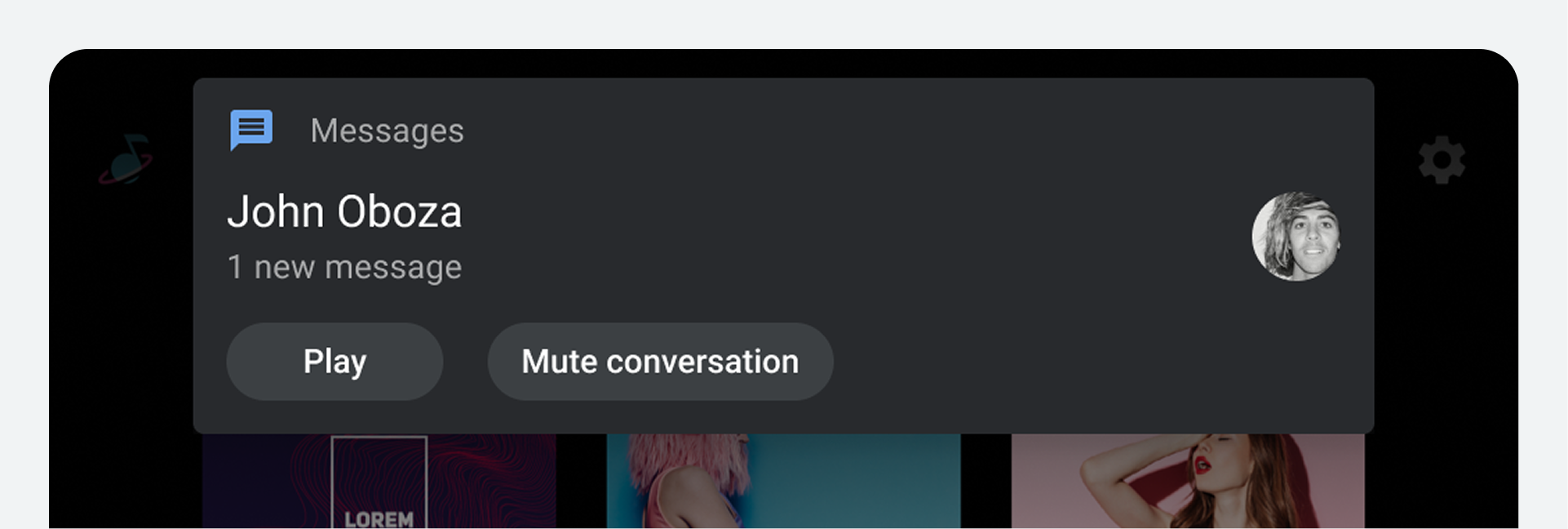
To allow drivers to deal with messages easily while paying attention to the road, message notifications in cars should provide the following two capabilities on the notification card:
Play : Reads the notification using either the Assistant or the default TTS (text-to-speech) reader provided by the platform
Mute conversation : Stops showing HUNs for a specific conversation for the remainder of the drive
If a conversation is muted, the messages from that conversation will still be available in the Notification Center.
Central de notificações simplificada
Nos carros, a Central de Notificações (às vezes implementada como uma aba retrátil) funciona como uma área de armazenamento temporário para notificações que o motorista pode querer acessar durante ou ao final da viagem. Ela exclui algumas categorias de notificações, limita o número de notificações exibidas durante a viagem e é apagada no início de cada viagem.
Details about what types of notifications appear in the Notification Center are provided in How car notifications work .
Consciência do estado de condução do veículo
Knowing a car's driving state – whether it is parked, idling, or moving – is a crucial factor in deciding how much information can safely be shown to drivers without distracting them.
O AAOS inclui um mecanismo de restrições de experiência do usuário (UX Restrictions Engine), que consiste em um conjunto de regras (configuráveis pelas montadoras) sobre o que pode e o que não pode acontecer durante determinados estados de condução. O mecanismo de restrições de experiência do usuário permite ações como as seguintes para notificações, com base no estado de condução (e, opcionalmente, em faixas de velocidade):
Ocultar pré-visualizações de conteúdo para mensagens
Truncamento de texto além de um comprimento especificado
Limiting the number of list items shown in the Notification Center and elsewhere
These restrictions can be removed in driving states where they're not needed, such as when the car is parked.
The message preview in a notification can be hidden or shown depending on whether the car is moving or not
Biblioteca Automotiva do Android
Driving state additional technical details for developers
Categorias e controles especiais
You can suppress turn-by-turn navigation notifications from appearing as HUNs.
In addition, AAOS includes three special notification categories you can control:
CATEGORIA_CAR_EMERGÊNCIA
CATEGORIA_CAR_WARNING
CATEGORIA_INFORMAÇÕES_DO_CARRO
The CAR_EMERGENCY and CAR_WARNING categories bypass typical ranking mechanisms, so they appear at the top of the list of notifications in the Notification Center.
[[["Fácil de entender","easyToUnderstand","thumb-up"],["Meu problema foi resolvido","solvedMyProblem","thumb-up"],["Outro","otherUp","thumb-up"]],[["Não contém as informações de que eu preciso","missingTheInformationINeed","thumb-down"],["Muito complicado / etapas demais","tooComplicatedTooManySteps","thumb-down"],["Desatualizado","outOfDate","thumb-down"],["Problema na tradução","translationIssue","thumb-down"],["Problema com as amostras / o código","samplesCodeIssue","thumb-down"],["Outro","otherDown","thumb-down"]],["Última atualização 2026-02-25 UTC."],[],[]]